
You just pushed a new campaign live, and it hits hard. A reel goes viral. Your comments section is blowing up. You should be celebrating, but instead, you feel a wave of anxiety. Your inbox is a complete mess, and your team cannot type fast enough to answer everyone. You already know the harsh truth: every minute a direct message sits unread, your brand bleeds money. Setting up social media auto strategy is the only way to stop losing these high-intent buyers.
Think about consumer behavior today. When a shopper asks, “How much is shipping?” or “Do you have this in a medium?”, they want an answer right then and there. If you take three hours to reply, they have already bought from your competitor. Trying to fix this by hiring more people to manually type out answers is expensive, exhausting, and eventually breaks under volume. The real fix is catching people the exact second they decide to buy.
That is where AI bot marketing and smart chat workflows change the math. Using platforms like Reflys, you can set up triggers that handle all the repetitive work for you. You connect your content directly to your checkout process, capturing leads day and night without burning out your staff. Let’s look at exactly how to build this growth engine.
Expert Insight: Over the past four years, I have built custom Meta API and WhatsApp workflows for dozens of e-commerce brands and as a chatbot for marketing agencies. We consistently see a 40% jump in direct sales when companies stop manual typing and start using rule-based chat triggers. Relying on humans to answer basic FAQs is a waste of payroll. Fast replies win the sale.
The Quick Win: Set Up an Instagram Auto Reply to Comments in 3 Minutes
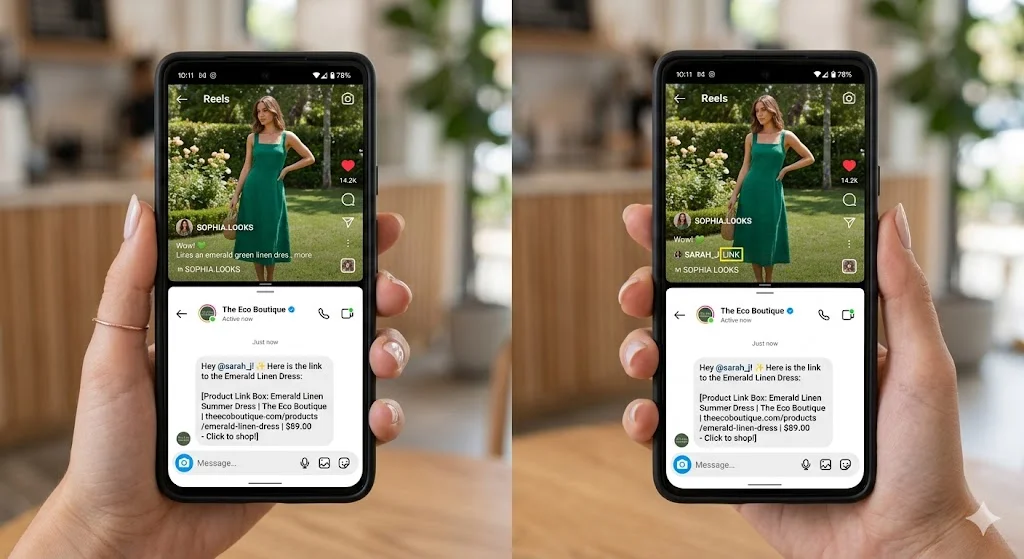
You do not need to know how to code to start capturing leads today. Here is a fast, practical workflow to set up an Instagram auto reply to comments sequence right now.
- Connect your accounts: Link your Meta Business profile to your automation dashboard.
- Pick a trigger: Create a new “Comment-to-DM” rule. You can apply this to one specific reel or to every post on your grid.
- Choose the keyword: Pick a specific word for your audience to type, like “VIP” or “LINK.”
- Write the DM: Draft a short, natural-sounding direct message that includes your product link or promo code.
- Turn it on: The moment you hit publish, the system will instantly send a DM to anyone who comments that keyword, while silently grabbing their contact info for your list.
Why Chatbot Advertising is Essential for Your Workflows
Sending traffic to a link in your bio adds friction. Every time you ask a user to leave the app, load a new web page, and navigate a menu, you lose a massive chunk of them.
Keeping the transaction inside the direct messages fixes this. Meta’s tools and the latest WhatsApp Business API let you build fully native shopping experiences. When you capture intent inside the chat, your conversion rates spike. Let’s look at the hard numbers between old-school manual replies and a modern setup.
| Metric | Manual Human Agent | Automated Chat Flow |
|---|---|---|
| Average Response Time | 45 minutes – 12 hours | Less than 2 seconds |
| Availability | 9 to 5, Monday to Friday | 24/7/365 |
| Average Open Rate (DM) | N/A (Reactive only) | 80% – 90% |
| Volume Capacity | 3 to 5 chats at once | Unlimited simultaneous chats |
Making Instagram Post Automation Actually Pay Off
It’s no longer enough to schedule your posts and then leave. Real Instagram post automation involves placing a sales funnel on every piece of content that you drop. You need to make your content do more work.
- Story Mentions: Add some rules that automatically send a thank-you DM and a 10% discount code to anyone who tags your brand in their stories.
- Live Event Triggers: While hosting an Instagram Live, tell your viewers to DM you a specific word. The system will auto-send them a hidden link, capturing their info while you keep talking.
- Carousel Hooks: Finish your learning carousels with a call-to-action that invites comments; then they will automatically receive the complete PDF learning guide in their inbox.
This is a combination of top-of-funnel views and bottom-of-funnel cash.
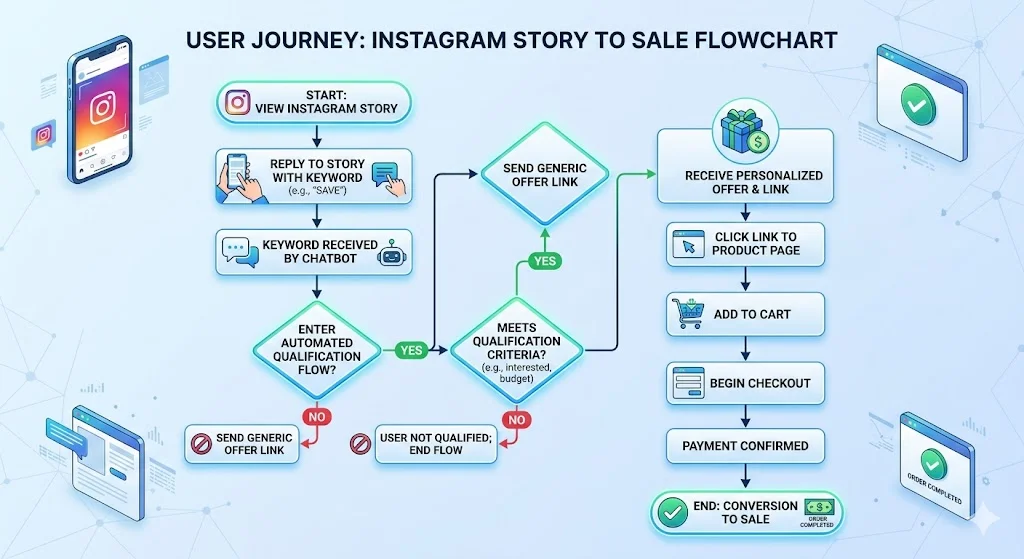
How to Build an Auto Responder for Instagram That Doesn’t Suck
Nobody wants to talk to a dumb bot that just says, “Please email support.” A high-converting auto responder for Instagram uses simple logic to route conversations correctly.
If a customer asks about a lost order, the flow sends them to a tracking portal. If they ask for your pricing, the flow sends them a swipeable gallery of your products where they can click and buy directly in the chat. You need to use software that actually supports these features without breaking Meta’s terms of service.
| Feature | Cheap Legacy Bots | Modern SaaS (Reflys Standard) |
|---|---|---|
| Building the flow | Clunky, requires coding | Simple drag-and-drop nodes |
| Connection Speed | Slow webhook delays | Direct Meta/WhatsApp API |
| Talking to a human | Drops the chat entirely | Passes chat to a live agent smoothly |
| Selling products | Boring text links | In-chat native visual shopping carts |
Advanced Moves: Instagram Comment Automation
Once you master the basics, you have to protect your accounts from spam filters. If you use Instagram comment automation and send the same reply to 500 different people, Meta will restrict your account.
You beat this by adding variance. Write three or four different versions of your reply (e.g., “Sent it your way!”, “Check your DMs!”, “Just messaged you the link!”). The system will rotate through them randomly, making the activity look human. You should also add conditions so the system only replies to comments that actually ask a question, ignoring spam or single emojis.
When things break, you lose money. Keep this cheat sheet handy to fix issues fast.
| The Problem | Why It Happened | How to Fix It Right Now |
|---|---|---|
| The system isn’t replying to comments | Post is set to private | Check your Instagram settings and make the account fully public. |
| Account got flagged for spam | Sending identical text too fast | Add 3-5 text variations inside your reply node. |
| Can’t send a follow-up DM | Past Meta’s 24-hour limit | Use approved message tags to re-engage the user legally. |
| Users click the link but get an error | Broken URL in your setup | Run a test using a secondary account before publishing the flow. |
Start Building Your Machine
Stop letting slow response times eat your ad budget. Buyer habits have changed, and relying on manual typing means you will lose ground to competitors who answer in seconds.
By building a real social media auto process, you lock down leads instantly, fix your customer service bottlenecks, and scale your sales without having to hire a massive team. Stop leaving cash in your comments section. Start your free trial of Reflys today and get your first chat flow live in minutes.