Your support desk is bleeding time on password resets, status checks, and locked accounts. Every minute a systems engineer spends answering basic login questions is a minute pulled away from actual infrastructure work. When message volume spikes across WhatsApp, Instagram, and your website, human operators simply cannot keep up. Adding chatbots for IT operations stops this leak. It handles the repetitive garbage so your team can focus on actual technical problems.
Trying to brute force your way through a flooded inbox by hiring more entry level support staff does not work anymore. Human agents need sleep. They take breaks. They make typos. They definitely cannot maintain the under-2-minute response times modern users expect, especially when juggling concurrent chats across five different platforms. The longer a user waits for a simple account fix, the faster they abandon your product entirely. It is a massive operational bottleneck that actively kills conversions.
You need a systematic fix, not just another inbox tool. Platforms like Reflys let you wire automation directly into your communication channels. By setting up an automated triage layer, your business can instantly intercept routine requests, route the complex stuff, and keep the pipelines clear. Let us break down exactly how to set up this architecture, avoid platform bans, and get your support desk running on autopilot.

Expert Insight: I have built chat funnels that process tens of thousands of automated system checks every week. If there is one thing I have learned, it is that fancy tools mean nothing if your basic API connections break under load. Real scale comes from strict compliance with Meta messaging rules and building rock solid webhooks. Do not build a bot to have a friendly chat. Build it to execute a specific backend task and get out of the user way.
The 3 Minute Quick Win: Build a Basic Comment to DM Trigger
You do not need a 6 month development cycle to start seeing results. You can launch a highly effective trigger right now that catches user intent on your social feeds and shoves it straight into your technical workflow.
Follow this exact sequence to build a comment to DM loop:
- Hook Up Your Pipes: Authenticate your Meta Business Suite or WhatsApp API credentials inside your automation dashboard like Reflys.
- Set the Listener: Create a rule that triggers only when someone drops a specific transactional word like “Setup”, “Access”, or “Status” on your posts.
- Draft the Payload: Build the automated response to fire off a direct message immediately. Include a secure webhook link or the exact setup PDF they need.
- Tag and Track: Append UTM parameters or unique tracking IDs to the payload link so you know exactly which users actually clicked through and resolved their issue.
The Technical Architecture of Chatbots for IT Operations
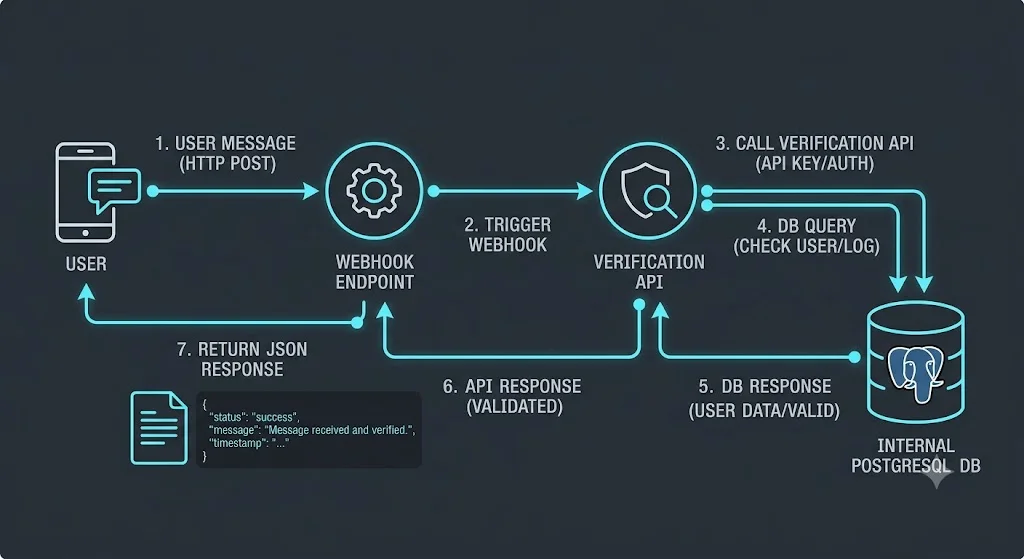
If you want this to work at scale, you have to understand the underlying mechanics. You are essentially building a bridge between Meta servers and your internal databases. That requires clean data, respect for rate limits, and zero tolerance for sloppy routing.
Playing by Meta API Rules
If you try to spam users or break Meta rules, they will shut off your API access in hours. When you automate via the WhatsApp Business API, any message sent outside the standard 24-hour user-initiated window must use a pre-approved Message Template.
These templates cannot be promotional garbage. They need to be strictly transactional. Think server status updates, MFA codes, or ticket resolution alerts. If you trigger high block rates from users, your phone number quality rating tanks, and your automated pipelines snap.
Channel Performance Data
Not all channels perform the same. If you are routing critical IT alerts, you need to know where the message will actually get read. The data below shows the brutal reality of relying on email versus direct API endpoints.
| Metric | Traditional Email Support | WhatsApp Business API | Instagram DM Flow |
|---|---|---|---|
| Open Rate | 15% to 25% | 85% to 98% | 70% to 85% |
| Response Time | Hours to Days | Under 2 Minutes | Under 1 Minute |
| Throughput Limits | Varies heavily by host | 20 to 1000 requests per sec | 100 API calls per user per hour |
| Payload Types | Text, heavy attachments | Rich text, PDF, interactive buttons | Text, quick replies, video |
| Backend Integration | Clunky polling or IMAP | Instant REST JSON payloads | Instant REST JSON payloads |
Triage, Commerce, and the First Contact Loop
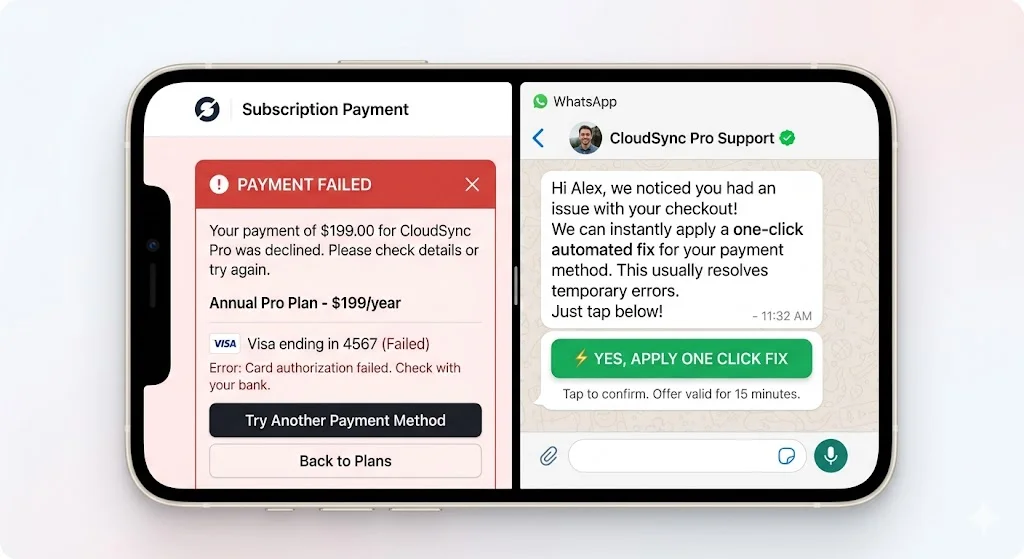
When you add an AI chatbot to your IT operations layer, your support desk suddenly becomes a revenue protector. Think about a user trying to upgrade their SaaS tier but hitting a technical error on the checkout page. If they have to email support and wait two days, that upgrade is gone.
Killing the Wait Time
An under-5-minute response is mandatory. When the automation intercepts the error, it should not just say we got your ticket. It needs to actively work the problem.
- Instant Auth Checks: The bot scans the input for an account ID, verifying the user status before exposing any internal data.
- Prefetching Context: Before a human ever sees the chat, the system pulls the user error logs from your AI CRM. The agent steps in already knowing exactly what crashed.
- Direct Deep Linking: Stop telling users to navigate to settings, then click billing, then click reset. Send them a single authenticated deep link that executes the fix instantly.
Building the Feature Matrix
Picking the right software matters. A basic marketing bot will collapse if you try to use it for heavy IT routing. Look at the differences between a cheap autoresponder and an operations grade framework.
| Feature Set | Cheap Marketing Bots | Operations Grade Automation | Why It Actually Matters |
|---|---|---|---|
| Logic Triggers | Basic exact match words | Regex patterns and semantic parsing | Users spell things wrong constantly. You need it to catch intent. |
| Database Sync | Manual CSV dumps | Real time REST APIs | Support needs live data, not a spreadsheet from yesterday. |
| Session Memory | Amnesia after 24 hours | Persistent user variable storage | The bot needs to remember what broke last week. |
| Asset Delivery | Static text dumps | Dynamic PDF and invoice generation | Users want proof of their ticket resolution instantly. |
| Human Handoff | Drops the chat entirely | Pauses bot and passes full metadata log | Agents need the full chat history to avoid asking the user to repeat themselves. |
Troubleshooting Broken Chat Pipelines
Things will break. Webhooks will timeout, APIs will update, and users will do things you never predicted. You need a fast diagnostic process to isolate the failure and patch the flow.
Fixing the Drop Offs
Keep this matrix handy. When your automated sequences start failing, the root cause is almost always one of these four things.
| What is Breaking | The Likely Suspect | How to Fix It Right Now |
|---|---|---|
| HTTP 504 Timeout | Your internal database is taking longer than 3 seconds to reply. | Build an async queue. Acknowledge the payload instantly, process the logic, then send a separate reply message. (Meta’s exact webhook timeout limit is often around 15-20 seconds depending on the specific API, though best practice is acknowledging within 3 seconds. You must return a 200 OK instantly before processing the backend logic.) |
| WhatsApp Fails to Send | The 24 hour window closed and you are not using a template. | Switch the node to use a pre-approved transactional Meta template or build an SMS fallback. |
| Trigger Ignoring Comments | Meta killed your Page access token. | Go into your integration settings, clear your cache, and completely reauthenticate the Meta Business profile. |
| Empty Variables in Chat | The user has heavy privacy settings blocking profile data scraping. | Always code a fallback string. If the first name is null, default to “there” so the message does not look broken. |
Hooking into the Backend: Data Sync
You are not just sending messages. You are moving data. To actually make this work, your frontend chat tool has to talk to your backend databases seamlessly.
Here is how you secure that pipeline:
- Lock Down Endpoints: Your webhooks should only accept JSON payloads from verified IP addresses associated with your automation provider.
- Scrub the Input: Users will type weird characters. Clean all incoming payload data before it touches your database to prevent basic injection attacks. For example, refine your JSON payloads and use parameterized queries on your backend to prevent SQL/NoSQL injection
- Force State Updates: The second a user finishes an automated reset flow, push an update to your CRM. Your human support team must always see the exact current state of the user account.
- Log Everything: Dump your system events into a central log. When a specific message step starts showing a high drop off rate, you need the historical data to figure out why.
Scale Your Systems and Protect Your Time
Relying on manual replies to handle routine IT requests is a massive drain on company profitability. Every hour a skilled tech spends digging through DMs to find a lost order number is an hour wasted.
By building chatbots for IT operations, you create a resilient setup that filters out the noise, solves the simple problems instantly, and protects your team’s time. Stop letting a bloated inbox dictate your workflow. Take control of your infrastructure, build out your automated pipelines, and start your Reflys free trial today to see exactly how much time you can buy back.