Broadcasting in Reflys: Instantly Connect with your Audience
What is Messenger Broadcasting In Reflys?
Looking to broadcast a message on Facebook Messenger to hundreds or thousands of users at once? Use the Click Messenger broadcast with Reflys! With the Messenger broadcasting feature, you can send a message to all your friends when you want. It is designed for marketing promotions, announcements, launches, reminders and communicating with your customers on a daily basis.
With Messenger Broadcasting, you can:
- Reach hundreds or thousands of contacts at once
- Filter your audience based on conditions
- Send rich media messages (text, images, buttons, links)
- Track opens and click rates.
- Improve visibility and customer engagement.
Reflys also supports WhatsApp Broadcasting, giving you another powerful channel to deliver automated updates. You can learn more about it here: WhatsApp Broadcast Help Guide.
Why Use Messenger Broadcasting? (Non-Promotional)
Messenger messages have extremely high open rates compared to emails or SMS. These broadcasts are ideal for maintaining communication, sharing necessary information, and nurturing relationships without direct sales messaging.
Not every message sent through Messenger is meant to sell something. Some messages simply share information, reminders, or educational content. These are referred to as non-promotional messages, and they must adhere to Meta’s guidelines to remain compliant.
Non-promotional messages include things like:
- Send important service notifications
- Share helpful educational or informational content
- Deliver order or account updates
- Remind users about upcoming events or deadlines
- Share product or feature announcements (non-sales)
- Re-engage customers with value-driven content
- Stay consistently active with subscribers
Before creating a broadcast campaign, ensure:
- You have connected your Facebook Page to Reflys Messenger
- Your Facebook Page Messaging permission is active
- You have subscriber contacts inside Reflys
These messages must NOT contain:
- discount codes
- offers or buy buttons
- sales links
- product promotions
Important: Reflys Messenger Broadcast supports non-promotional broadcasting, so every message you send must be informational and value-based.
How to Create a Messenger Broadcast in Reflys?
Follow the simple steps below:
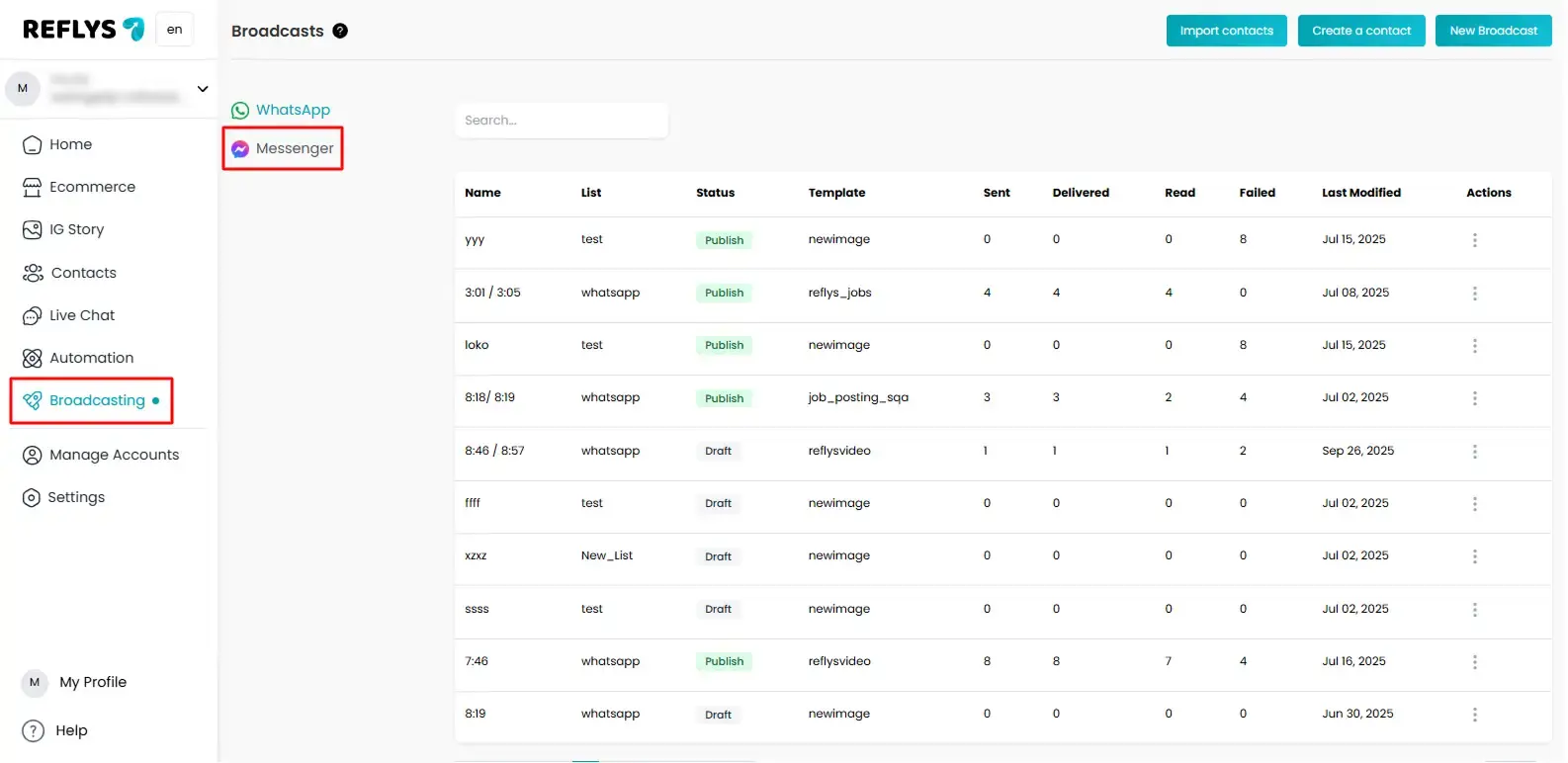
Step 1 – Open Messenger Broadcast Section
- Log in to your Reflys dashboard
- From the left menu, click Broadcast Campaigns
- Select Messenger Automation
Step 2 – Click on “Create New Broadcast”
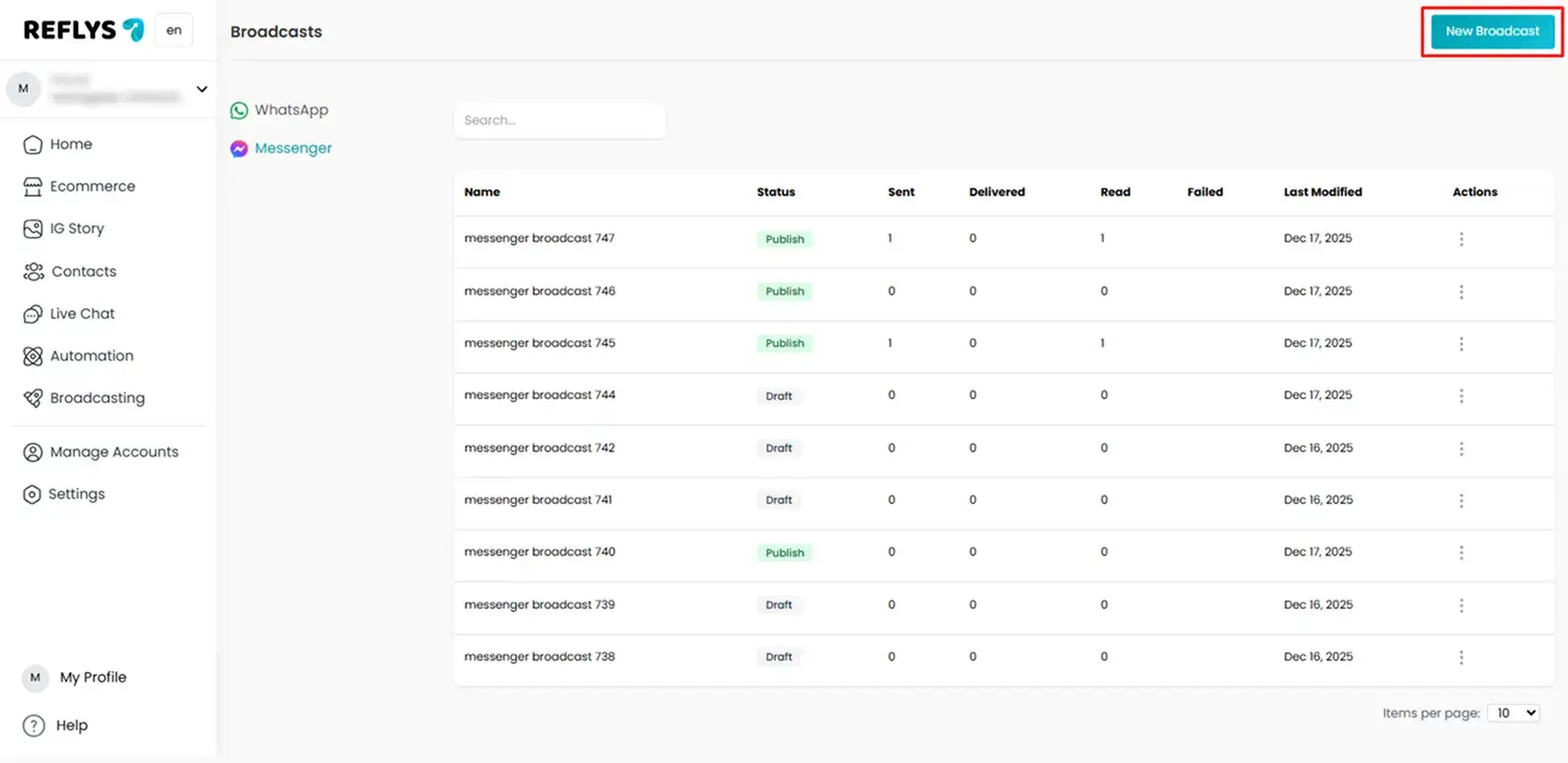
On the broadcast screen:
- Click the Create Broadcast button
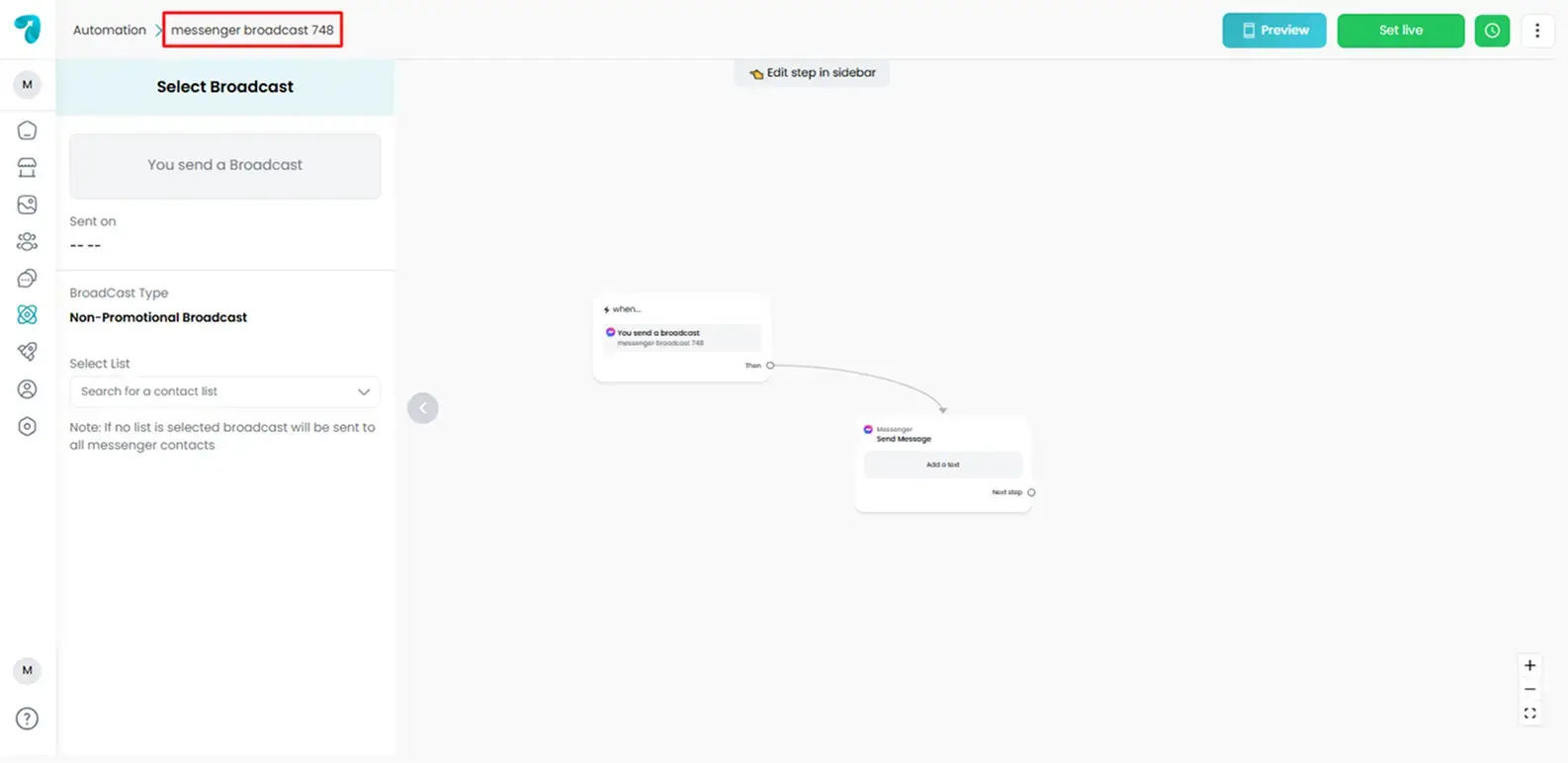
Step 3 – Name Your Broadcast Campaign
Enter a clear campaign name, e.g.:
- “New Year Sale Offer”
- “December Product Launch”
This name is only for your internal dashboard reference.
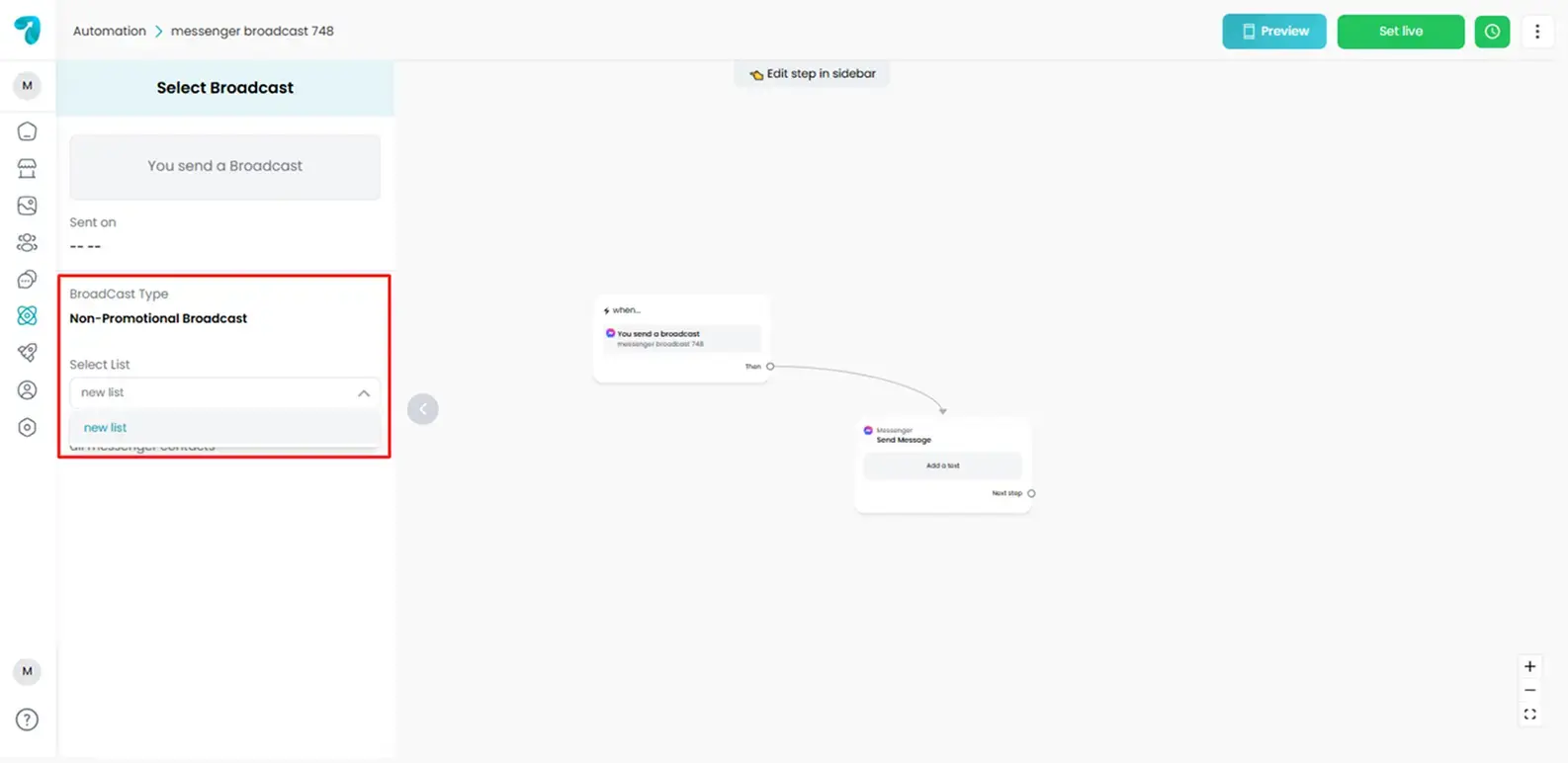
Step 4 – Select Broadcast Audience
Choose who will receive the message.
You can:
- Send to all contacts, or
- Contact list
- You can also edit the contact list from the Reflys dashboard Contact section.
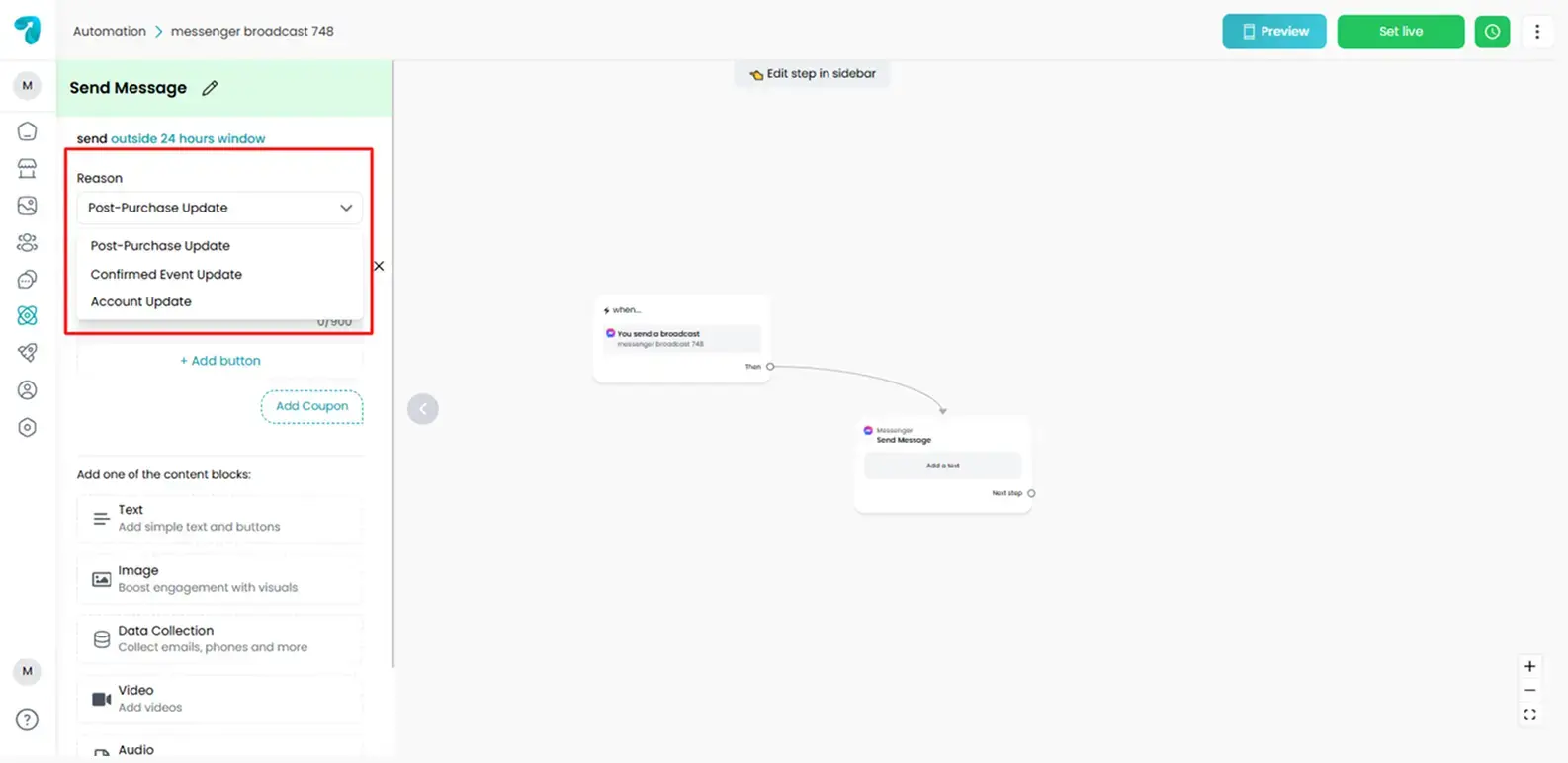
Step 5 – Select a Reason for Broadcast
Choose a reason from the dropdown list for your broadcast message. There are three reasons you can choose from
- Post-Purchase Update
- Confirmed Event Update
- Account Update
Step – 6 Create Your Message Content
Write the message you want customers to receive.
Messenger supports:
- Text
- Buttons
- URLs
- Images / GIFs
- Quick Reply options
Tips for content:
- Keep it short
- Add value
- Avoid spam words
- Add a CTA button
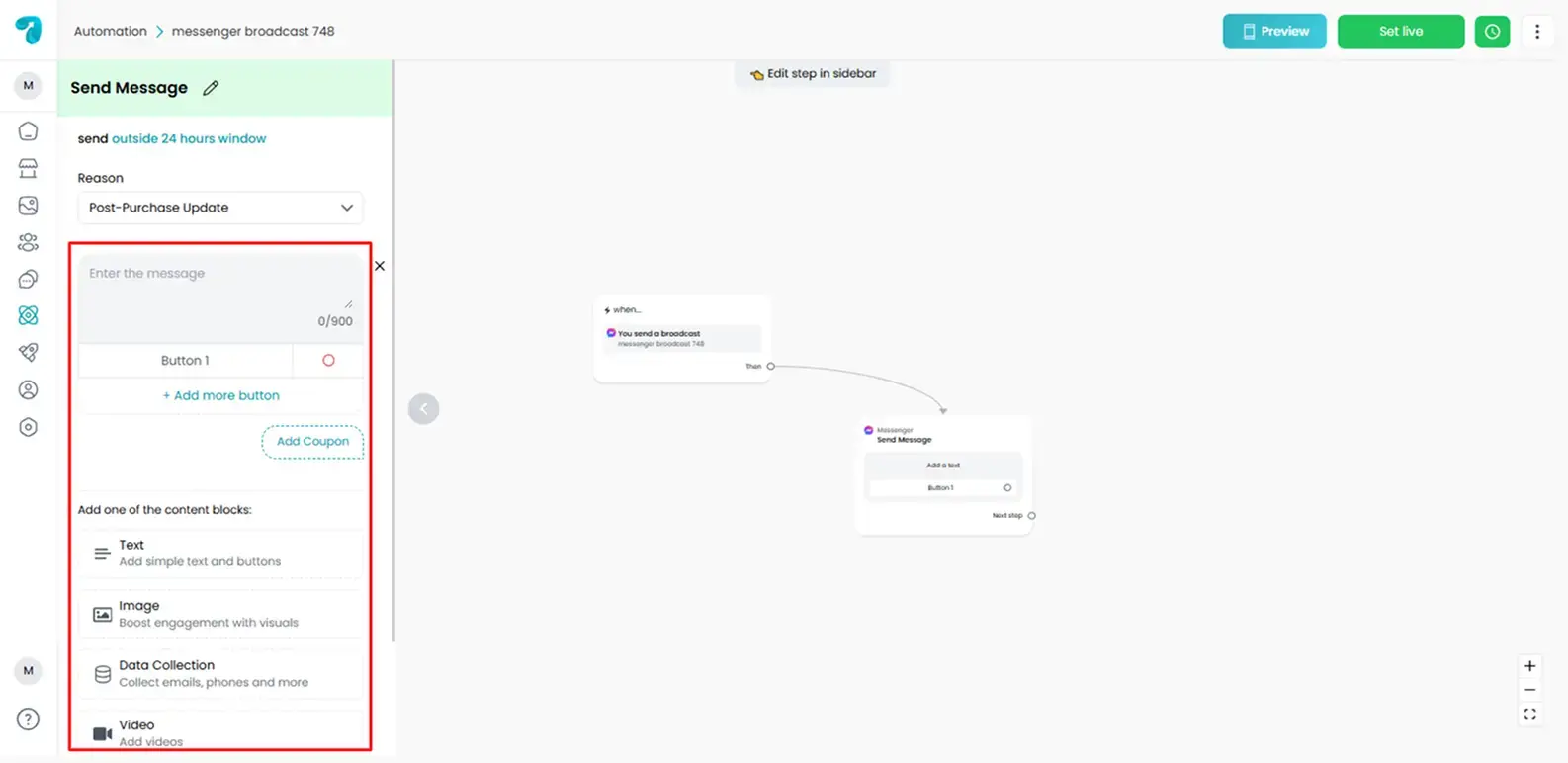
Important: Ensure your broadcast message is valid, clear, and properly formatted to avoid message rejection or potential blocking from Meta.
Step 7 – Add Buttons (Optional)
Buttons help create action:
Examples:
- View Product
- Claim Discount
- Visit Website
- Chat with Support
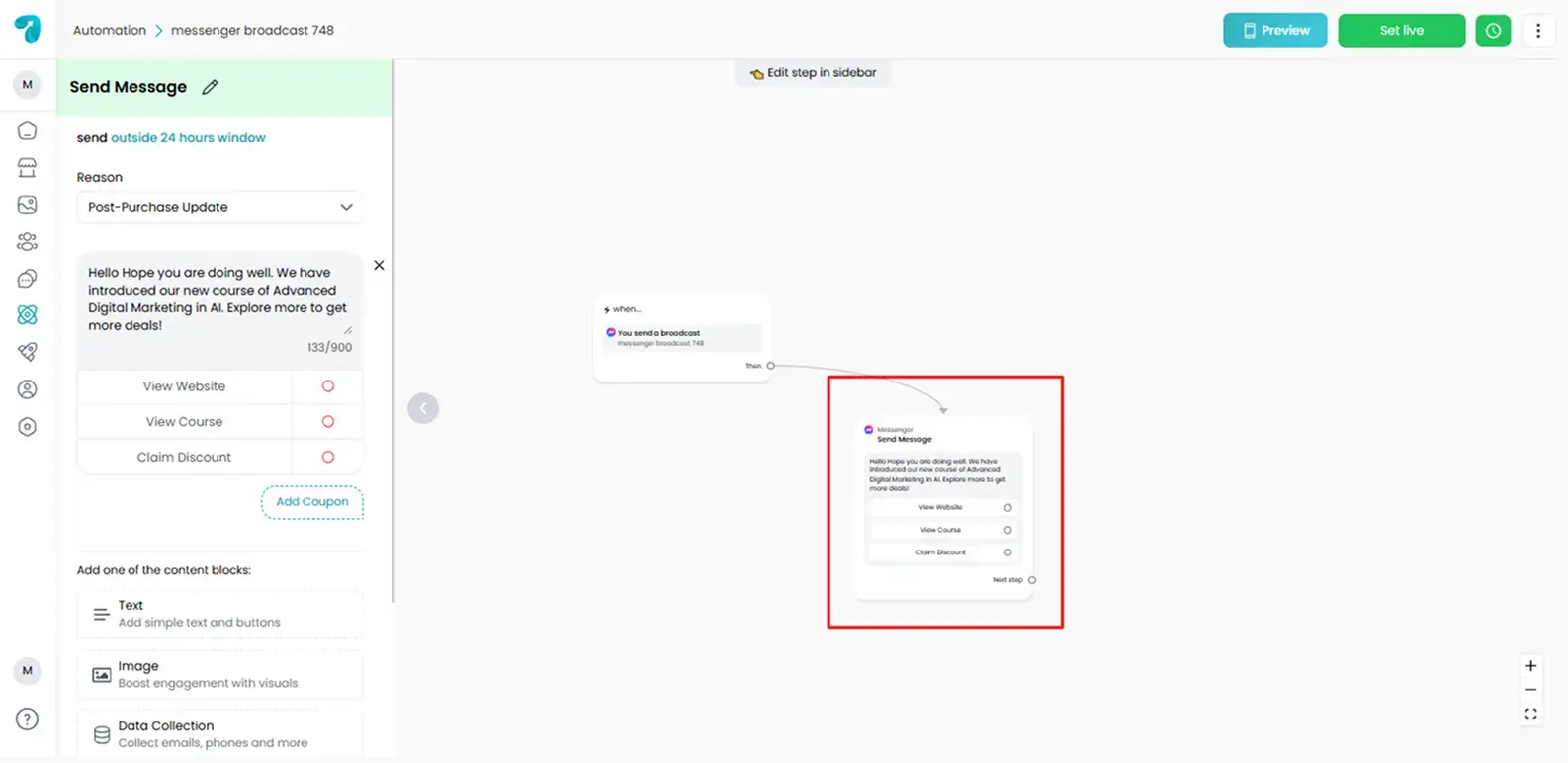
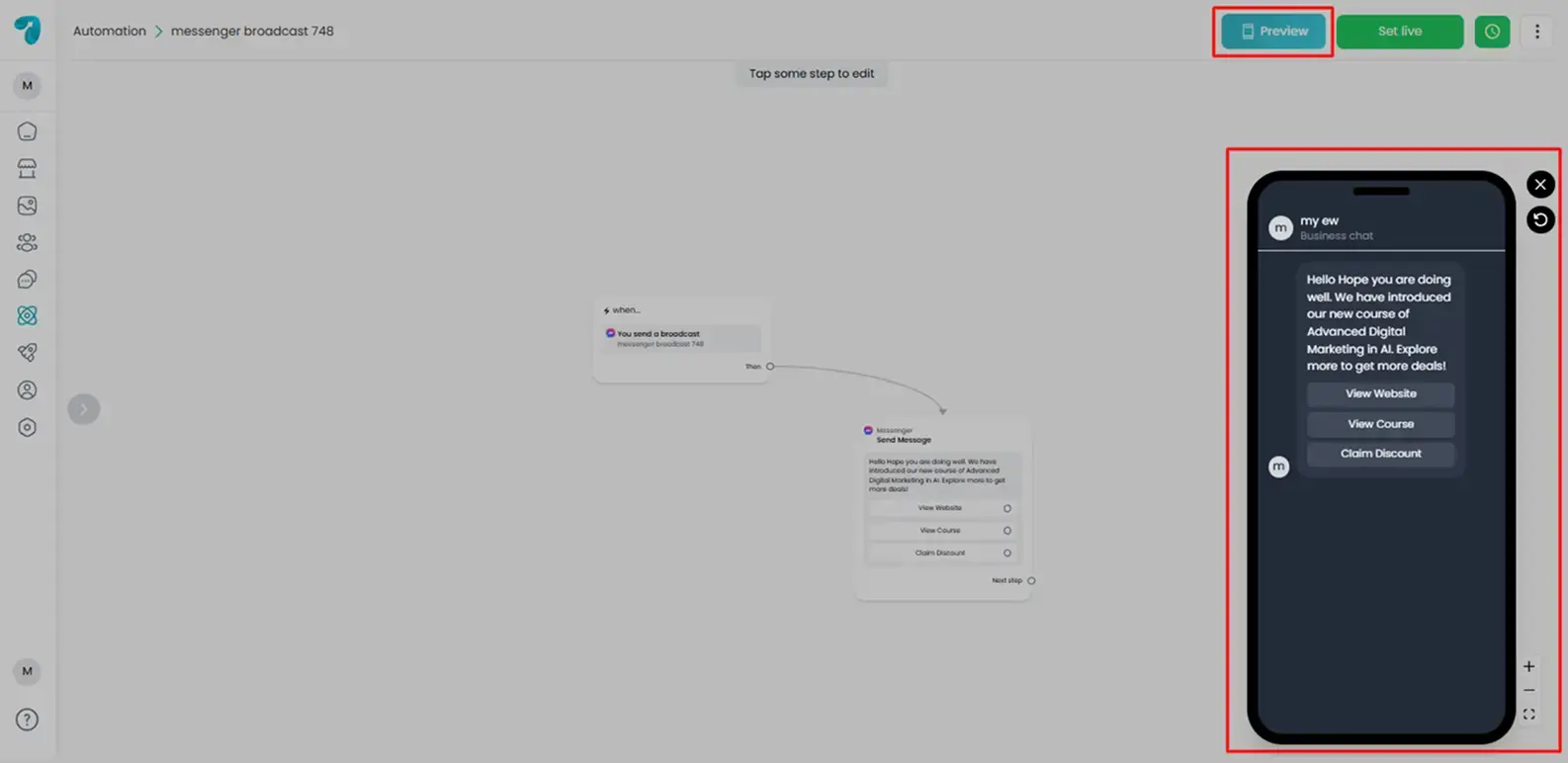
Step 8 – Preview Your Message
Before sending, review:
- Text format
- Buttons
- Links
- Emojis
- Multimedia
Step 9 – Choose Sending Method
You have two options:
Set Live
Broadcast is delivered instantly.
Schedule
Choose:
- Date
- Time
Time
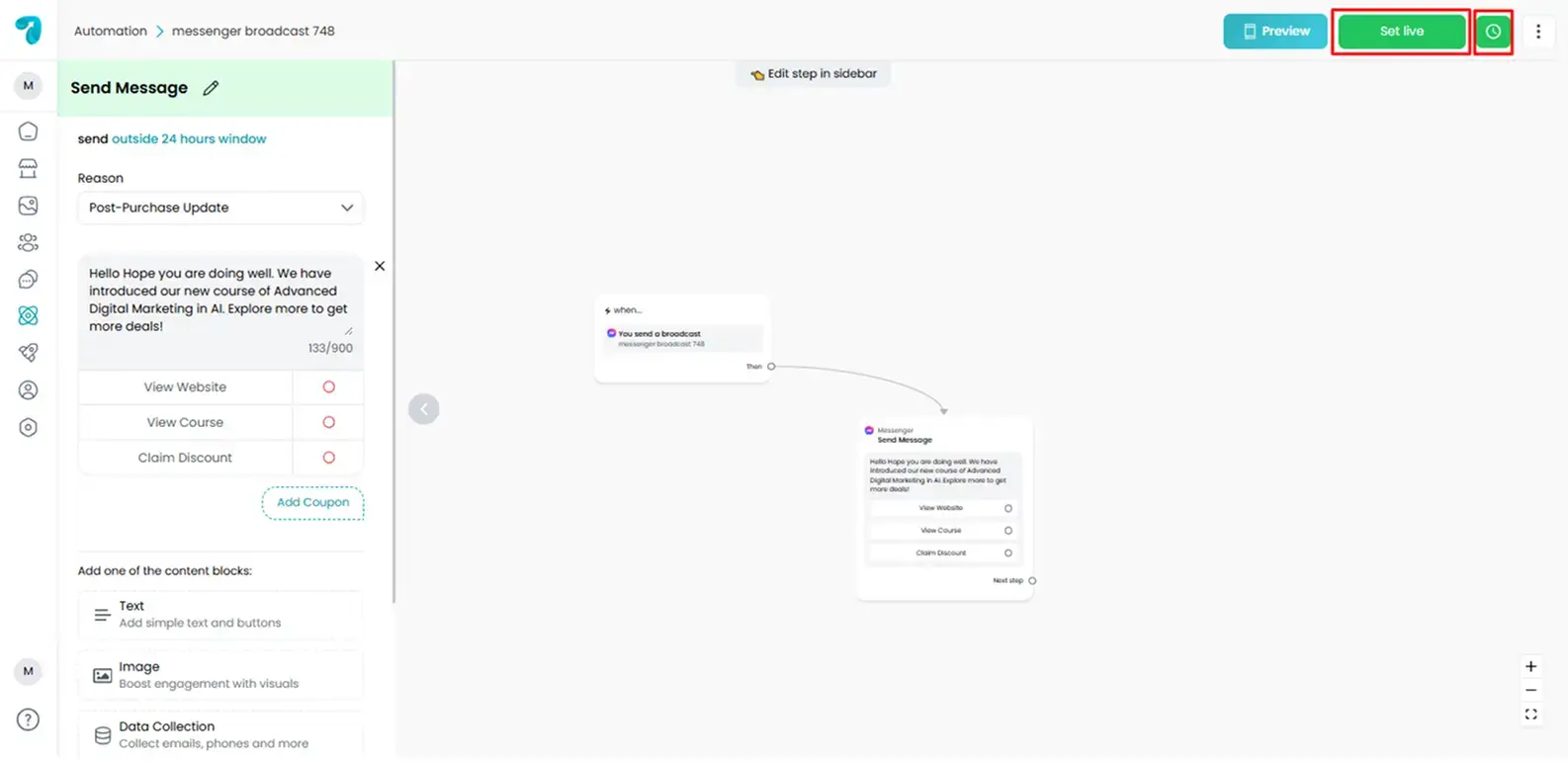
Step 10 – Confirm & Set Live
Click Send Broadcast
Once sent, delivery begins immediately or at the scheduled time.
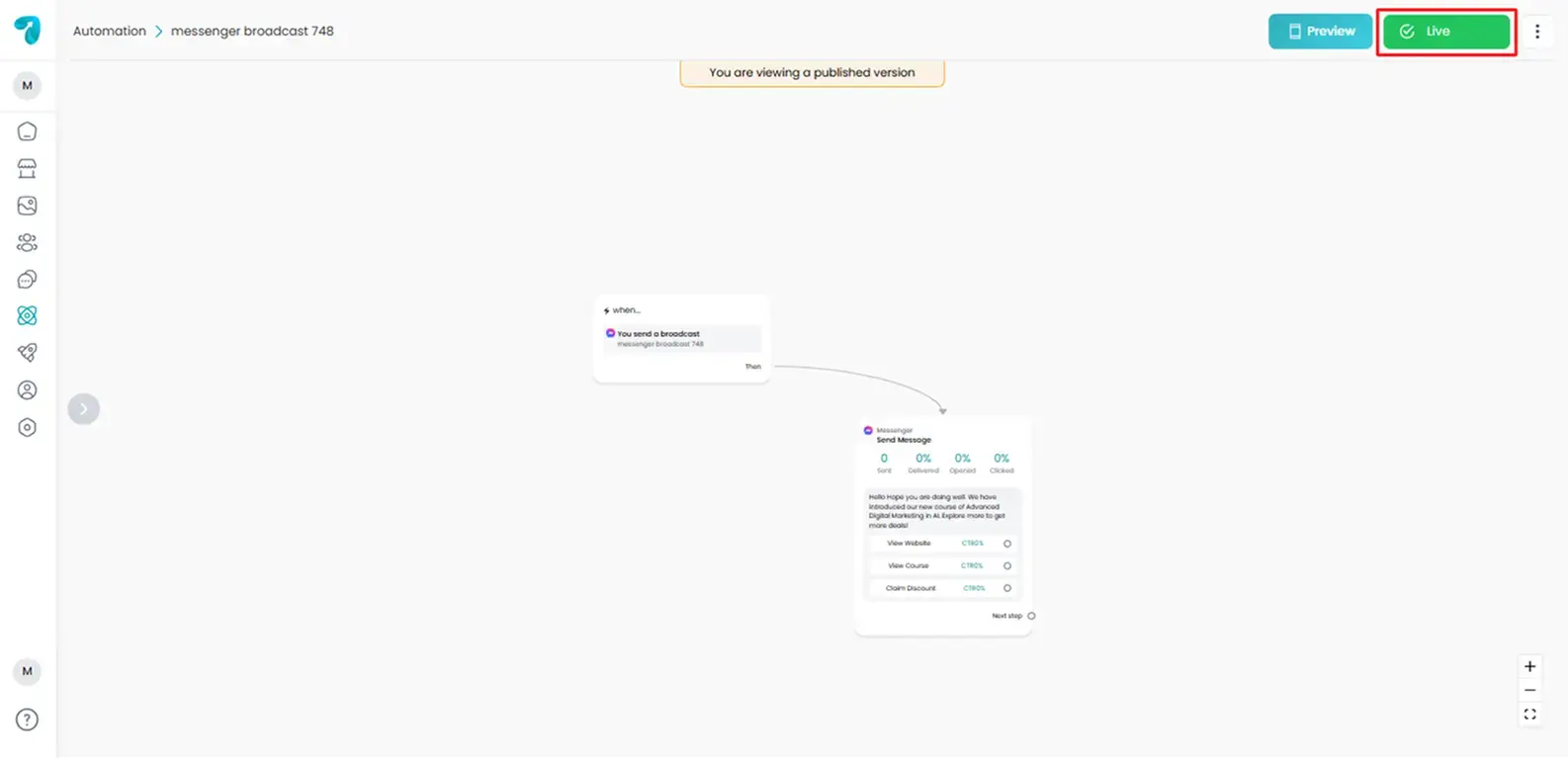
Broadcast Analytics & Tracking
After delivery, you can check:
- Sent: How many contacts did the message was delivered to?
- Delivered: Contacts who received the message but have not opened it yet.
- Read: Contacts who opened and read the message.
- Failed delivery: Number of contacts who failed to receive a broadcast message.
Click-through rate (CTR) counts unique clicks from the first message with a clickable button.
These numbers help you:
- Check engagement
- Improve message style
- Adjust sending time
- Understand audience behavior
This helps you understand performance and improve future broadcasts.
Limitations on Non-Promotional Messaging
Meta does not allow unlimited non-promotional messages for all Pages. Only specific Page categories, especially news publishers, can send unlimited subscription messages.
For most businesses, including Reflys users, Meta requires you to follow strict rules and correct messaging categories.
To send non-promotional broadcasts outside the 24-hour window, businesses must rely on approved message tags.
Message Tags
Message Tags allow you to send important, non-promotional updates to users outside the 24-hour window. They are only for messages the customer expects and needs — not marketing promotions.
Here are the four most useful tags:
Post-Purchase Update Tag
Used for:
- delivery updates
- receipts
- returns information
Confirmed Event Update Tag
Used for:
- event reminders
- event updates or date changes
Account Update Tag
Used for:
- password reset
- billing updates
- profile changes
Human Agent Tag
Used when:
- A human support agent is replying
- The conversation needs more than 24 hours
- The customer issue needs manual attention
Stay Compliant With Meta Rules
Meta is very strict about how Messenger broadcasting works. Breaking policy rules can:
- block your broadcast delivery
- get messages rejected
- temporarily disable broadcasting access
To avoid issues:
- Send only non-promotional content
- respect the 24-hour messaging window
- Select the correct Message Tags where needed
- Avoid sending links in non-promotional broadcasts
- never attach sales or promotional material
Best Practices for Safe Non-Promotional Broadcasting
Always get user permission
Users must interact or opt in before receiving ongoing messages.
Keep your messages clear
Focus on helpful, useful communication.
Avoid sending unnecessary messages
Over-messaging can lead to blocks or spam reports.
Provide unsubscribe options
This protects user experience and prevents account damage.
Troubleshooting Guide
Message Not Sending?
Check:
- Page Connected
- Contacts subscribed
- Facebook permissions
Low open rate?
Try:
- Different timing
- Shorter messages
- Clear CTA
Failed delivery?
Check:
- 24-hour rule
- Correct contact audience
Sometimes broadcasts fail or stop sending. Common reasons include:
Policy violations?
If your message looks promotional, delivery may be blocked.
Examples:
- Buy Now button
- Discount message
- Promotional link
Wrong messaging tags?
Tags must match the message type. If not, the broadcast is rejected.
Sending links?
Meta may treat links as promotional content by default.
Spam reports?
If users mark your message as spam, delivery may be limited.
Large audience?
Broadcasting to a very large list may take extra time.
If a broadcast is blocked, Meta may:
- Stop delivery to some or all contacts
- Restrict sending for 24 hours
- Unsubscribe from some contacts
Conclusion
Messenger Broadcasting on Reflys is a powerful communication tool that helps businesses reach customers instantly with high delivery and engagement. Using filtered targeting, scheduled messages, analytics, and multimedia support, you can execute professional campaigns effortlessly.