You spend thousands on targeted ads, finally get a decision-maker to click through, and they send a direct message asking about enterprise pricing. And then, they wait. Your sales reps are tied up answering basic support questions, so that high-intent lead sits in the queue for 45 minutes. By the time your team finally responds, the buyer’s interest has vanished, and they are already browsing your competitor’s site. If you want to capture demand in real time, implementing a chat automation platform is absolutely mandatory.
Relying on manual triage breaks the moment your business starts scaling. Your account executives end up acting like glorified human routers, copying and pasting the exact same qualification questions over and over. They waste hours talking to tire-kickers who have zero budget, which creates a massive bottleneck for the actual buyers trying to get through. You end up missing Service Level Agreements (SLAs), burning out your customer success team, and watching easily closeable revenue slip right through the cracks just because nobody was available to say “yes” fast enough.
The fix isn’t hiring more people to man the inbox; it’s building a smarter filter. By setting up an automated messaging platform with actual conditional routing logic, you can score traffic in the background and hand the high-ticket prospects straight to your closers in seconds. Let’s look at the exact routing setups you need to filter the noise, qualify your traffic, and fast-track your best buyers.
Expert Insight: When I consult for mid-market SaaS companies, the biggest mistake I see is using automation just to send a “We will be right with you” message. That kills momentum. In a recent Reflys deployment, we stopped asking users for their company size. Instead, we captured their email, used a background API to check their company revenue, and automatically routed anyone over the $10M mark directly to the VP of Sales’ Slack channel. We cut response time to 1.2 seconds and increased closed-won deals by 32% that quarter.
The Advanced Quick Win: Dynamic Lead Scoring via JSON Webhooks
Before we look at the larger system, you need to set up this specific technical win to separate serious buyers from the noise immediately. Stop using basic keyword triggers. Instead, build a multi-step workflow that uses webhook POST requests to dynamically score inbound users based on external data points you pull in the background.
Here is how it works in practice. Set up your system to record the business e-mail when a user initiates a conversation. When they press send, send a webhook to an enrichment service (Clearbit, Apollo, etc.). Parse the returned JSON payload in real-time. If the payload shows the user’s company uses a specific technology stack or hits a certain revenue threshold, the system instantly tags the conversation as “Tier 1.”
At that exact moment, the sequence bypasses the standard qualification questions entirely and routes the thread directly to the active senior account executive with a high-priority alert. The buyer feels like they got immediate VIP treatment, and your rep steps into a conversation fully armed with the lead’s company data before they even type “hello.”
Building Your Chat Automation Platform for Complex Sales Cycles
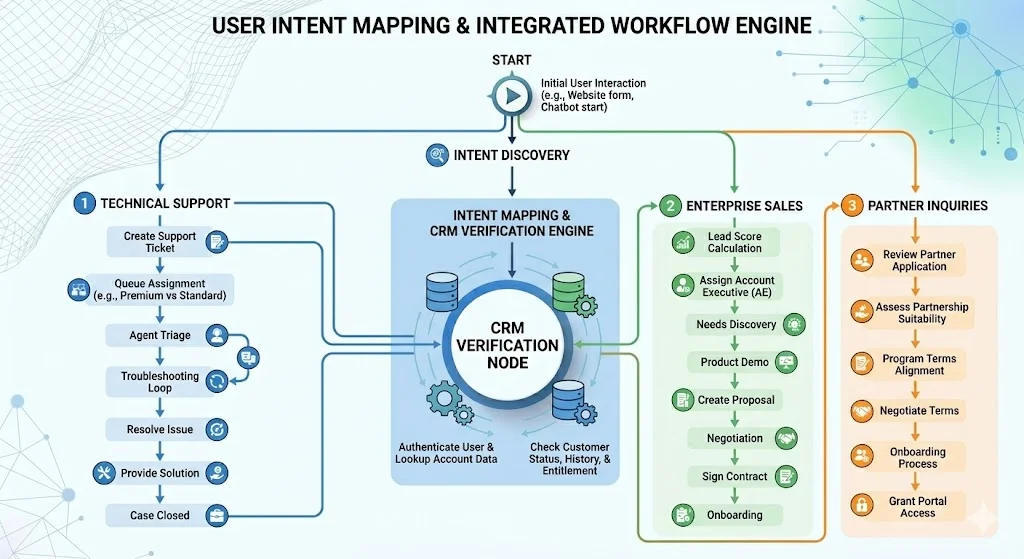
Setting up a robust conversational pipeline requires looking way beyond simple input-and-output mechanics. Customer chat automation needs to talk directly to your existing CRM architecture. When a prospect sends a message, your system should instantly verify who they are against the databases you already pay for.
Are they an existing customer trying to report a bug? Are they a completely cold prospect looking for a demo? The software has to utilize meta API endpoints to pull this context immediately. Without that contextual awareness, the interaction feels incredibly disjointed, and you end up alienating users by asking for information you already have. Building these pathways means you need to map every potential user intent to a specific business outcome.
Troubleshooting Multi-Node Conditional Logic
To achieve seamless routing, you rely on multi-node conditional logic. This is where you actually see the ROI. You manage traffic asynchronously by using a set of rules to evaluate user responses. However, complex node architectures introduce distinct failure points. When you handle external API payloads or users type something unexpected, things can break. You need to know how to fix them fast.
Advanced Troubleshooting Matrix for Multi-Node API Parsing
| Error State | Primary Symptom | Root Cause Analysis | Corrective Action |
|---|---|---|---|
| Payload Timeout | Conversation abruptly stalls after the user submits an email address. | The external enrichment API took longer than the 5-second webhook timeout limit. | Add a delay message: Give me one second to check my system. If your CRM is slow by nature, try switching to another processing.different type of processing. |
| Parsing Failure (Null Value) | The automation just loops back on the “Fallback” or “Error” path, again and again. | The JSON response from the webhook lacked a key that the condition requested (e.g. employee_count was returned empty). | Add a conditional step, check the existence of the key before evaluation. |
| Infinite Loop | The user is asked the same qualification question repeatedly. | The variable capture node is not writing the user’s input to the custom field because of a string vs integer mismatch. | Standardize input formatting. If numerical values are returned, make sure that they are interpreted as integers before sending them to the CRM update node. |
The Capability Gap: Basic Auto-Responders vs. Enterprise Systems
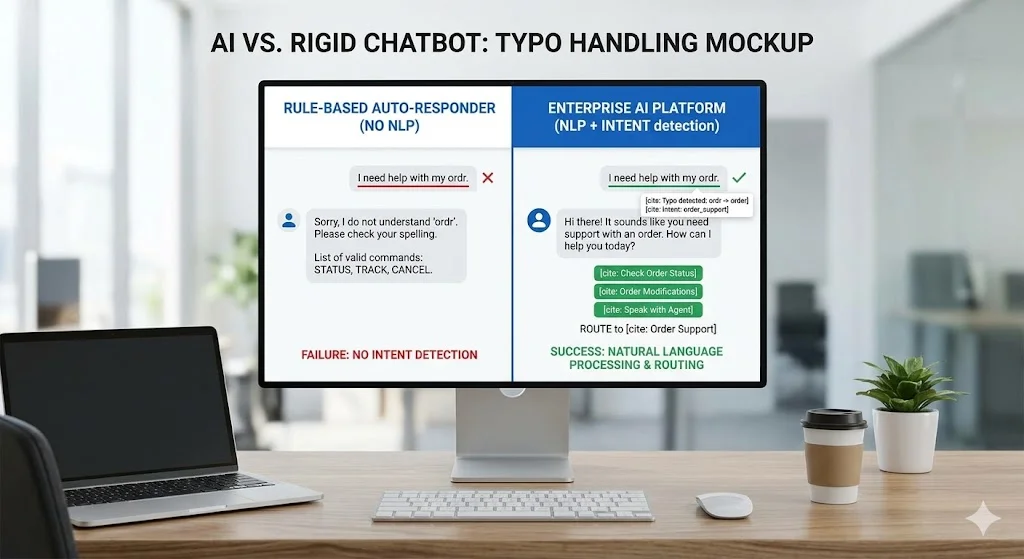
Many founders mistakenly turn on a basic auto-responder in Meta Business Suite and assume they have fully solved the problem. An auto-responder just reacts blindly to a keyword. An AI chatbot platform manages state, remembers contextual history, and integrates with external tools.
When your inbound volume spikes, the limitations of basic tools become glaringly obvious. They cannot process multi-step qualifications. They completely fail to recognize returning visitors, asking them the same onboarding questions a second time. And they cannot securely process transactional data. Upgrading to a comprehensive system allows you to orchestrate the entire buyer journey right inside the direct message interface.
API Capability Comparison: Basic vs. Enterprise
| Technical Capability | Basic Auto-Responder | Enterprise AI Chatbot Platform |
|---|---|---|
| State Management | Stateless. Forgets the user context immediately after the interaction ends. | Stateful. Remembers past interactions, cross-referencing previous support tickets and purchase history. |
| Data Enrichment | None. Relies entirely on explicit, manual user input. | High. Silently pings external databases via webhooks to append demographic data instantly. |
| Routing Logic | Routing Logic Straight line. If the user types ‘A’ then sends message ‘B’. | Consider many variables (time of day, lead score, agent workload) to decide where the message goes. |
| API Rate Limit Management | It crashes and loses messages under traffic spikes. | Queues requests, uses exponential backoff, ensuring 100% message delivery compliance. |
Securing Meta API Compliance Without Sacrificing Velocity
When you set up business chat automation across channels like WhatsApp or Instagram, playing by the platform-specific API rules is non-negotiable. Meta strictly enforces 24-hour interaction windows. If you attempt to send promotional sequences outside this window without utilizing approved message templates, they will restrict your API access immediately. You cannot afford to lose your primary communication channel over a sloppy blast message.
A highly capable system tracks these SLAs dynamically. It calculates the exact timestamp of the user’s last inbound message, visually flagging the remaining response window for your human agents on the dashboard. Additionally, it automates the opt-in distribution of recurrent notifications. This makes sure your outbound marketing engine is 100% compliant with worldwide data privacy legislation and platform-specific limits.
Scaling Up: The Financial Impact of Automated Workflows
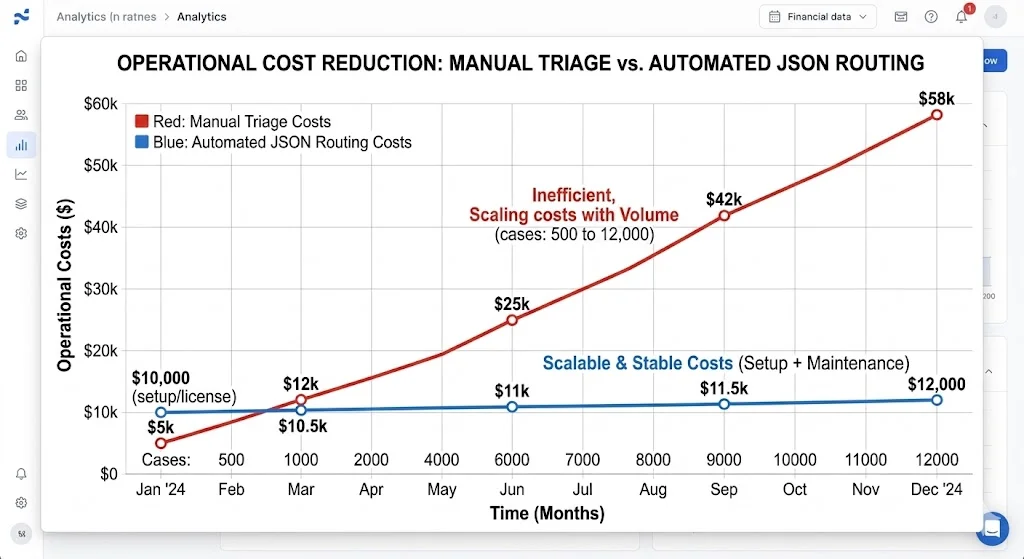
Scaling a company demands predictable systems. As your web traffic and social presence grow, your direct message channels take the brunt of the impact. Deploying custom JSON routing logic does require an upfront investment of engineering and strategic thinking, but the unit economics shift dramatically in your favor once you flip the switch.
Every single automated qualification represents human hours saved. Every instantly routed enterprise lead represents a protected pipeline. The entire goal is friction reduction. You want to ensure that the user achieves their desired outcome—whether that is booking a software demo, downloading a technical whitepaper, or resolving a billing error—with zero manual intervention from your staff unless absolutely necessary.
Cost-Benefit Analysis: Custom JSON Routing vs. Manual Triage
| Metric | Manual Triage Process | Custom JSON Routing Platform | Business Impact |
|---|---|---|---|
| Average Initial Response | 35 Minutes | 1.5 Seconds | Capture buyer intent instantly; substantial reduction in drop-off rate. |
| Cost Per Qualified Lead | High (Human agent hourly rate + CRM entry time) | Negligible (Fractional cent cost per API call) | Sheer scalability – operational costs are absolutely flat as the volume of messages grows. |
| Data Accuracy | Average (Possible human data-entry typos) | Perfect (Direct field-mapping from user input straight to the CRM) | Cleaned database, precise segmentation for future retargeting campaigns. |
| Off-Hours Capture | Outside Business Hours Capture 0% (Completely up to your shift patterns) | 100% | Captures global traffic seamlessly; generates pipeline while your sales team sleeps. |
Finding Leaks in Your Data Pipeline
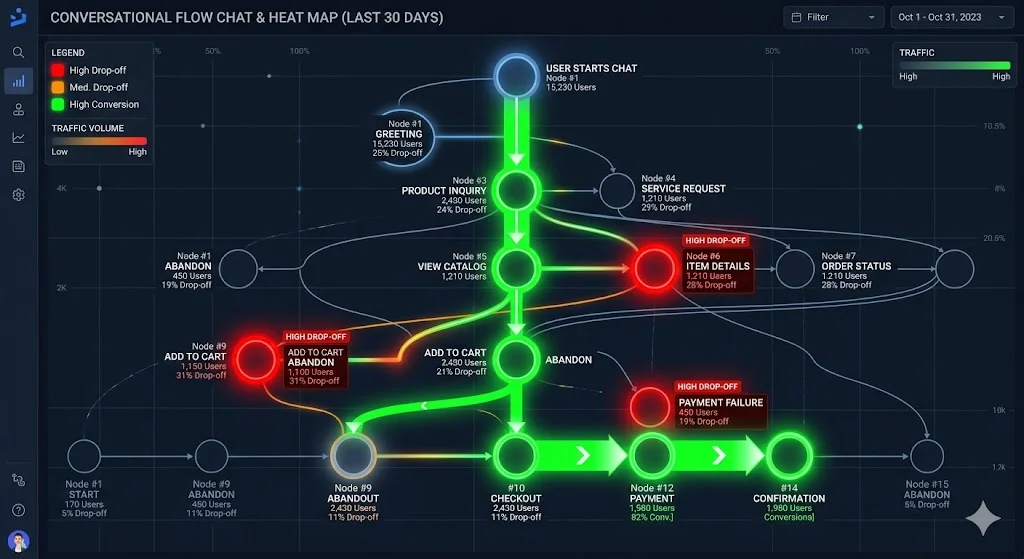
You cannot just set this up and walk away. The final step is optimizing the data pipeline. An automated messaging platform generates thousands of data points every single day. Analyzing exactly where users stop responding inside your conversational flow tells you exactly where your messaging is broken.
For example, if 60% of users abandon the sequence the second you ask for their phone number, the data is telling you a very clear story. The perceived value of whatever you are offering does not outweigh the privacy cost of giving up their number. By continuously refining the specific nodes based on this hard quantitative feedback, you engineer an incrementally more efficient conversion machine month over month.
Ready to Scale Your Inbound Revenues?
Scaling your inbound revenue requires ruthless efficiency. Manual sorting is a massive tax on your sales velocity. A chat automation platform with structural logic, dynamic Webhook scoring and accurate routing turns your direct messages into a highly optimized and frictionless pipeline. Don’t let a high intent buyer cool off after waiting for a manual response. Start your free trial of Reflys today and save your team’s time and increase your conversational conversions.