You just spent hours planning a campaign, but the moment you ask, “how do i post something to instagram,” you are already thinking about the wrong problem. Getting the content live is the easy part. The real bottleneck hits about three seconds later. A user comments asking for a price, another wants a link, and three more slide into your DMs asking about shipping. If you take three hours to reply, those leads are gone. They already bought from a competitor who answered faster.
Expert Insight: I spent years watching e-commerce founders burn through ad budgets because their inbox was a mess. We tracked the numbers. Dropping your DM response time from 30 minutes to under 60 seconds routinely doubles conversion rates. You don’t need a better product picture; you need a system that answers questions while you sleep.
Typing out replies by hand doesn’t scale. You cannot build a seven-figure brand if your social media manager acts as a human router, copying and pasting the same checkout link fifty times a day. Buyers want friction-free shopping. If they have to wait, you lose the sale. The answer isn’t hiring more people to stare at a phone screen. The answer is to tie your content directly into the Meta API.
This is where software like Reflys steps in, with DM automation and many other power features to pace up your communication and lead generation process. You stop using your page like a digital billboard and instead use it as a sales funnel. Every bit of content becomes a trigger. Let’s discuss how to get your posts live, but even more importantly, how you can create the backend logic needed to catch every single person who touches it.
The Quick Win: Build a Comment-to-DM Trigger in 3 Minutes
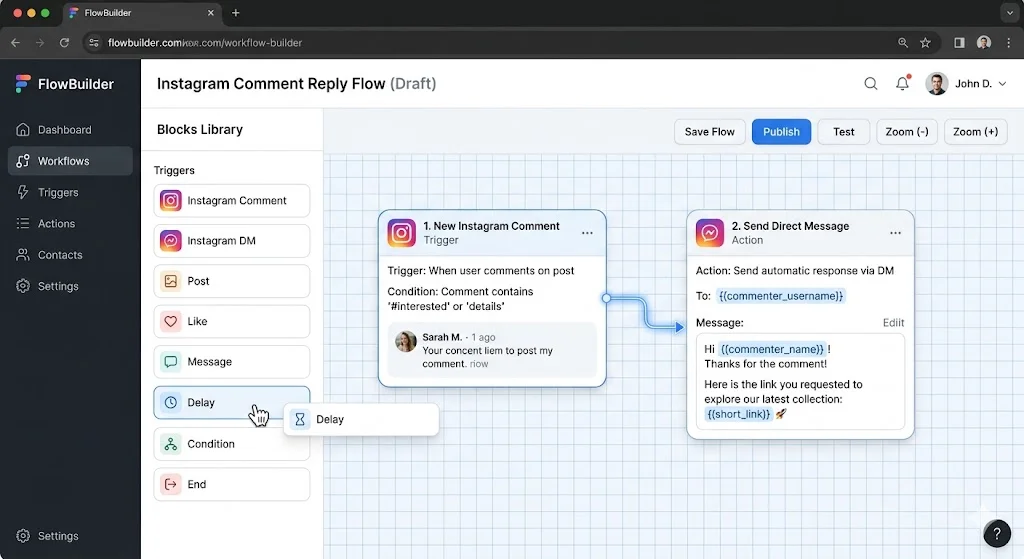
Before you upload your next graphic, set up the safety net. You need a system to catch the traffic. Here is a fast way to automate lead capture:
Connect the API: Log into Reflys. Link your Instagram Business account. This routes everything through Meta’s official channels so you stay compliant.
Set the Rule: Pick “Comment on Post” as the starting point. Tell the system to watch for specific words like “LINK,” “SHOP,” or “PRICE.”
Write the Script: Draft the automated direct message. Keep it short. “Hey! Here is the direct link for the jacket from our latest post: [Link].“
Push it Live: Turn the automation on. From now on, anyone who comments your trigger word gets the link instantly, zero manual work required.
The Basics: How Do I Post Something to Instagram?
If you are handing off the account to a junior hire and need a refresher on how to make a post on Instagram, here is the standard operating procedure. To optimize a post on Instagram, you need to know how to do it.
Step 1: Open the Instagram App
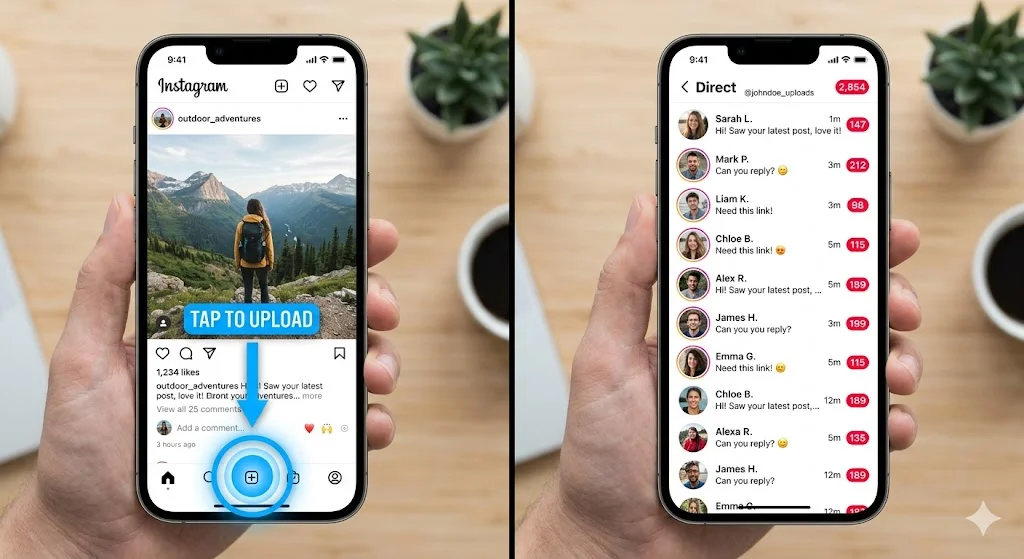
Open the app on your phone. At the bottom center of the display, press the plus (+) button. You have an option for Post, Story, Reel & Live.
Step 2: Select Your Content
Select your high-res product photo or video. Forget the filters, buyers want to know what it actually looks like.
Step 3: Write a Strong Caption
Tell them exactly what you need them to do next in a caption. “Send us a SALE comment to enjoy 20% discount.” Then hit “Share.”
From that moment, when the post goes live, you will be getting DMs from people. If a buyer is fine with the angle of a product but wants to see it from another perspective, you should be able to dispatch and send the pic on Instagram DMs quickly and easily. Open the message thread, tap on the camera icon in the type box, select the picture from your camera roll and send. Doing this once is fine. Doing this 400 times a day during a product launch will break your team. That is exactly why we move to conversational commerce.
Moving to Conversational Commerce
Brands that actually make money build infrastructure. You don’t just rely on hoping people click the link in your bio. Platforms like Reflys and Chatfuel proved years ago that automated customer support works. Data from recent consumer habit reports shows buyers prefer interacting with a fast, accurate bot over waiting hours for a human.
When you use a platform like Reflys or Tidio, you map out the conversation ahead of time. You anticipate the questions. If someone asks about returns, the system hands them the policy. If they are looking for specific instructions, the automation will directly lead to a product card.
Table 1: Manual vs. Automated Operations
| Metric | Manual Replying | Automated Workflows | Business Reality |
|---|---|---|---|
| Average Response Time | 2 to 12 hours | Under 3 seconds | Immediate answers capture high-intent buyers before they leave the app. |
| Lead Capture Rate | 5% – 10% | 40% – 60% | Forces users into a trackable sales sequence. |
| Staff Hours Required | 20+ hours / week | 2 hours / week (Monitoring) | Lets your team focus on strategy instead of copy-pasting. |
| Account Risk | Prone to action blocks | 100% Meta Compliant | Protects your account from temporary bans. |
Writing Auto-Replies that Convert
Bad copy ruins good automation. If your auto-reply sounds like an automated phone menu from 2004, people will ignore it. Follow these rules when setting up your Reflys chat flows:
- Keep the Context: If they comment on a video about running shoes, the DM needs to mention the running shoes immediately.
- Keep Content to the Point: No one reads long paragraphs in a DM. One sentence, one link.
- Offer Human Support: Always give them a button to “Talk to a Human” if the automated flow doesn’t solve their problem.
- Use Authentic Media: The Meta API allows you to add clickable buttons and image carousels. Use them. A button converts better than a URL.
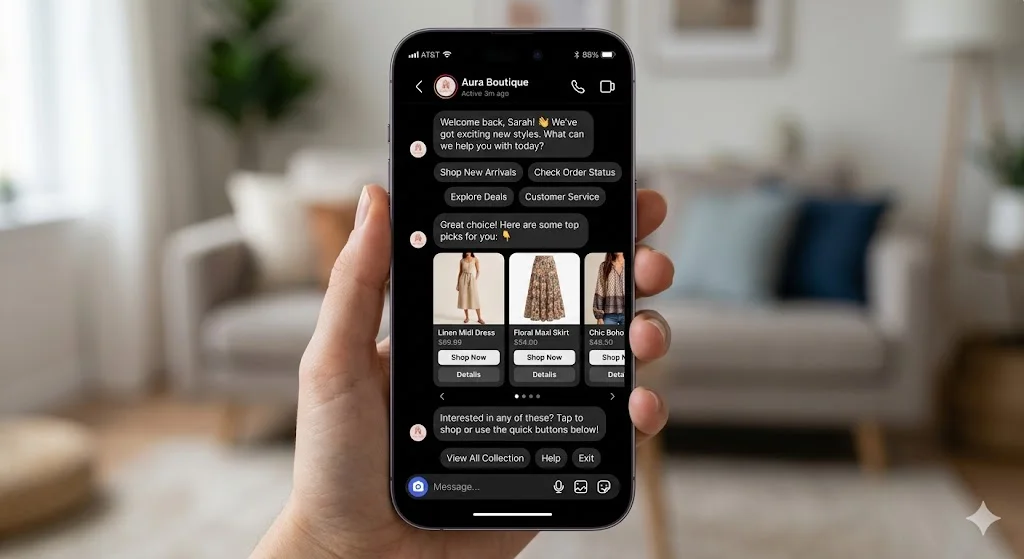
Table 2: Tech Stack Feature Matrix
| Feature | Native Instagram App | Legacy Chatbots (e.g., Tidio) | Modern Growth Suites (Reflys) |
|---|---|---|---|
| Comment-to-DM Routing | No | Yes | Yes (Handles multiple keywords) |
| Official Meta API Access | Yes | Yes | Yes |
| Visual Flow Mapping | No | Varies | Yes (Drag-and-drop canvas) |
| Centralized Inbox | Limited | Yes | Yes (Instagram, WhatsApp, FB combined) |
Playing by Meta’s Rules
If you try to run your business on unapproved third-party scrapers, Instagram will ban your account. It happens constantly. You have to use the official Meta Developer API.
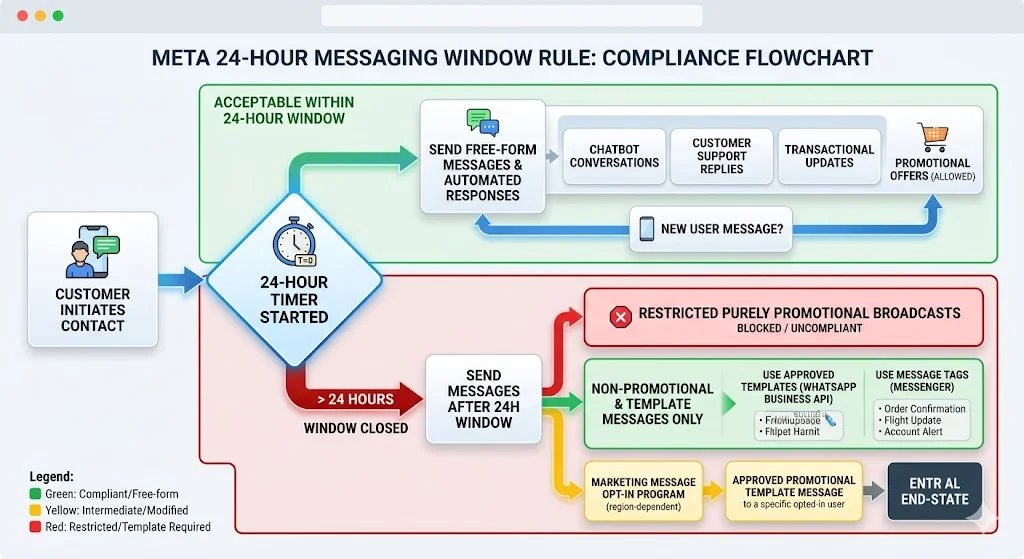
Meta enforces a strict 24-hour messaging window. When a customer sends you a DM, the clock starts. You have exactly 24 hours to message them back using an automated flow or a live agent. If you try to send them a promotional message on day three, the API blocks it. To message them outside that window, you have to use approved Message Tags or pay for sponsored messages.
Reflys is built to keep you inside these technical boundaries. It focuses on the 24-hour window automatically and prevents users from responding once the limitation is exceeded, so you don’t violate the terms of service.
Fixing Broken Chat Flows
Technology breaks. When you connect software to social media, things occasionally disconnect. You need to know how to fix backend errors fast so you don’t leak leads.
Table 3: System Troubleshooting Guide
| The Problem | The Probable Cause | How to Fix It Fast |
|---|---|---|
| Bot won’t trigger on comments | Missing Facebook permissions | Go into Facebook Business Settings. Ensure Reflys has ‘Manage Comments’ toggled on. |
| “Message outside 24-hour window” | The user interacted too long ago | You missed the window. Change your flow to require user input, or use a standard Message Tag. |
| Images fail to load in the DM | File is too heavy or the wrong format | Not sure how to send a picture to Instagram via bot? Check your file specs; compress your images to standard JPG under 8MB. |
| Dashboard stops pulling messages | Meta access token expired | Go to your Reflys settings and click “Re-authenticate” to refresh the connection to Instagram. |
Stop Typing, Start Scaling
You started out trying to figure out how do i post something to Instagram, but publishing is just step one. The brands that scale are the ones that turn attention into a structured, automated conversation instantly. Stop wasting your staff’s time typing out manual replies. Stop losing revenue because your inbox is too crowded to manage. Build a backend system that handles the traffic for you. Capture your leads, protect your time, and start a Reflys free trial right now.